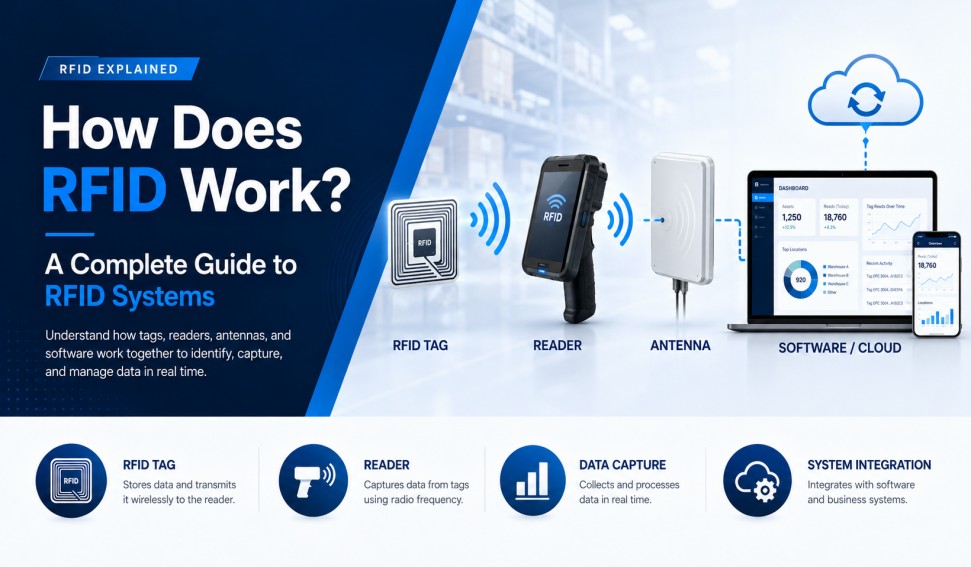
How Does RFID Work? A Complete Guide to RFID Systems
RFID works by using radio waves to exchange data between an RFID tag and an RFID reader. The reader creates a controlled radio-frequency field, the tag responds with stored identification data, and software converts the read event into useful business information.
That simple explanation is accurate, but a reliable RFID deployment involves more than a tag and a scanner. Antenna placement, frequency, tag construction, surrounding materials, reader settings, software filtering, and operating workflow all affect the result.
This guide explains how RFID works step by step, what each system component does, and what businesses should evaluate before implementation.
The Four Main Components of an RFID System
Most RFID systems contain four functional layers.
1. RFID Tag
The RFID tag is attached to the object that needs to be identified or tracked. It normally contains:
-
An integrated circuit, often called the RFID chip
-
An antenna that receives and transmits radio signals
-
A substrate that supports the chip and antenna
-
A protective or printable construction, such as a label, card, wristband, hard tag, or industrial enclosure
The tag stores an identifier and, depending on the chip, may also provide user memory, access controls, sensor functions, or security features.
2. RFID Antenna
The reader antenna creates the radio-frequency read zone and receives the response from tags. Its polarization, gain, beam pattern, installation angle, and distance from the tagged item strongly influence system performance.
A reader may use an integrated antenna or connect to one or more external antennas. Fixed readers often support several antenna ports so that multiple doors, shelves, workstations, or conveyor zones can be monitored.
3. RFID Reader
The RFID reader, also called an interrogator, controls communication with the tags. It sends commands through the antenna, receives tag responses, decodes the data, and passes useful information to software.
Readers are available as:
-
Fixed RFID readers
-
Handheld RFID readers
-
Desktop or USB readers
-
Integrated readers with built-in antennas
-
Gate, tunnel, cabinet, and portal systems
4. Software and Business Systems
Raw RFID reads are not automatically useful. Software filters duplicate reads, applies location and time context, matches tag identifiers with products or assets, and triggers business actions.
RFID data may connect with:
-
Warehouse management systems
-
Enterprise resource planning systems
-
Manufacturing execution systems
-
Retail inventory platforms
-
Asset management software
-
Access control systems
-
Cloud-based analytics tools
How RFID Works Step by Step
Step 1: The Reader Creates a Read Zone
The reader sends an electrical signal to the antenna. The antenna converts that signal into radio waves and creates a read zone around the intended area.
The shape of this zone is not a perfect bubble. It changes according to the antenna type, reader power, reflections, nearby metal, liquids, walls, machinery, and the orientation of the tag.
Step 2: The Tag Enters the Radio Field
When a compatible tag enters the read zone, it detects the reader signal.
For a passive RFID tag, the reader field supplies the energy needed to activate the chip. The tag does not require its own transmitter or battery for normal communication.
An active RFID tag works differently. It has its own power source and transmitter and can broadcast a signal according to the design of the active system.
Step 3: The Reader Sends a Command
The reader sends a command that compatible tags can understand. Depending on the protocol and workflow, the command may ask tags to identify themselves, return data, write new information, change a memory setting, or perform another supported function.
Step 4: Tags Respond
A passive UHF RFID tag changes the way it reflects the reader signal. This process is called backscatter. The reflected signal carries the tag data back to the antenna and reader.
When many tags are present, the protocol coordinates their responses so that the reader can identify individual tags rather than receiving one unusable collision of signals.
Step 5: The Reader Decodes the Data
The reader converts the received radio response into digital information. It may collect data such as:
-
EPC or another item identifier
-
Tag identifier information
-
User-memory data
-
Signal strength
-
Antenna or read-zone number
-
Time of the read
-
Supported sensor or status data
Step 6: Middleware Filters the Read Events
A single tag can be read repeatedly while it remains in the field. Middleware or reader software removes unnecessary duplicates and applies business rules.
For example, software can determine that:
-
A carton has arrived at receiving
-
An asset has passed through a doorway
-
A garment has moved from a stockroom to a sales floor
-
A component has reached the next production station
-
A tagged tool is missing from its assigned cabinet
Step 7: The Business System Takes Action
The filtered event is sent to the relevant application. The system may update inventory, confirm a shipment, generate an alert, authorize access, record production progress, or create an audit trail.
This final step is where RFID becomes a business solution rather than merely a radio technology.
How Passive, Active, and Battery-Assisted RFID Work
Passive RFID
Passive tags do not contain a radio transmitter. They receive energy from the reader field and respond by coupling or backscatter, depending on the frequency and system design.
Passive tags are widely used because they can be small, economical, and maintenance-free. Common applications include retail inventory, logistics, access cards, library systems, product authentication, asset identification, and manufacturing tracking.
Active RFID
Active tags normally contain a battery and transmitter. They can broadcast over longer distances and may support sensors or repeated beacon signals.
They are commonly considered for high-value mobile assets, vehicles, containers, yard operations, and real-time location applications where longer range is more important than low tag cost.
Battery-Assisted Passive RFID
Battery-assisted passive tags use a battery to power the chip or sensors but still communicate through a passive-style response rather than a fully active transmitter. They can help support sensing or improve performance in specialized applications.
What Information Does an RFID Tag Store?
An RFID tag does not need to store an entire product record. In many systems, the tag stores a unique identifier, and the business database stores the descriptive information connected to that identifier.
This approach allows a small tag memory to reference much richer data, such as:
-
Product name and model
-
Serial number
-
Batch or lot information
-
Owner or department
-
Maintenance history
-
Current status
-
Last known read point
-
Shipment or order information
Some tags also provide user memory for application-specific data, but the amount and structure depend on the chip and standard.
What Determines RFID Read Range and Reliability?
There is no universal read range for an RFID tag. Performance depends on the complete system.
Frequency
LF, HF, NFC, and UHF systems interact differently with objects and environments. UHF is frequently chosen for longer-range item identification and bulk reading, while HF and NFC are commonly used for shorter-range interactions.
Tag Antenna and Chip
The tag antenna must be appropriate for the intended frequency, item size, surface material, and orientation. A smaller tag may fit the product but provide less performance than a larger optimized design.
Tagged Material
Metal can detune or reflect radio energy, while liquids can absorb or alter RF signals, especially at UHF. Products containing metal or liquid often require specialized tag structures and careful placement.
Orientation
The orientation of the tag relative to the reader antenna affects coupling and read reliability. Circularly polarized antennas can help with mixed orientations, while linearly polarized antennas may provide stronger performance when orientation is controlled.
Reader Power and Antenna Placement
More power does not automatically create a better system. Excessive power can cause unintended reads outside the target zone. A professional design balances power, antenna selection, shielding, placement, and software filtering.
Interference and Reflections
Nearby readers, machinery, dense metal structures, electrical equipment, and the physical layout can change the RF environment. Site testing is essential.
Examples of RFID Workflows
Retail Inventory
Each item receives a unique RFID label. Store staff use handheld readers to count inventory without individually locating every barcode. The software compares the captured identifiers with expected stock and highlights discrepancies.
Warehouse Receiving
Tagged cartons or pallets pass through a fixed read point. The system identifies the items, compares them with the advance shipment information, and updates receiving records.
Manufacturing Tracking
RFID tags identify materials, components, tools, carriers, or work-in-process units. Readers at production stations record each movement and help the manufacturing system maintain process visibility.
Asset Management
Durable RFID tags are attached to equipment. Handheld or fixed readers support audits, transfers, check-in/check-out, maintenance, and missing-asset searches.
Access Control
An HF or NFC credential is presented close to a compatible reader. The system verifies the identifier and access rights before unlocking a door or recording attendance.
Common Misunderstandings About How RFID Works
RFID Does Not Automatically Provide Precise Location
A read proves that a tag was detected by a particular reader or antenna. Precise real-time location requires a purpose-built location architecture, additional signal processing, or another positioning technology.
RFID Does Not Read Every Object Through Every Material
Radio waves can pass through some non-metallic packaging, but metal, liquids, shielding, orientation, distance, and tag design can prevent reliable reads.
A Powerful Reader Cannot Fix the Wrong Tag
The tag must be designed and placed for the object and environment. Increasing power cannot compensate for a severely detuned or poorly positioned tag.
RFID Data Still Needs Business Logic
Without software rules, a system may produce large volumes of duplicate or irrelevant reads. Good deployments define what each read means before hardware is installed.
How to Plan an RFID Project
A practical RFID project should begin with the workflow rather than the hardware catalog.
-
Define the business event that must be captured.
-
Identify the objects, materials, sizes, and environmental conditions.
-
Choose the appropriate RFID frequency and tag construction.
-
Define the required read zone and acceptable missed-read rate.
-
Test several tag designs on the real item.
-
Test the reader and antenna layout in the actual environment.
-
Define data filtering, integration, and exception handling.
-
Run a controlled pilot before scaling.
-
Document reader settings, tag placement, and operating procedures.
-
Monitor performance after deployment.
Frequently Asked Questions
Does an RFID tag need a battery?
Not always. Passive RFID tags operate without a battery by receiving energy from the reader field. Active tags use their own power source, while battery-assisted passive tags use a battery for chip or sensor functions but communicate through a passive response.
Can RFID read multiple tags at once?
Many RFID systems, especially UHF systems designed for inventory, can identify multiple tags in one read zone. Actual performance depends on tag density, protocol, reader settings, orientation, materials, and the RF environment.
Does RFID require line of sight?
RFID does not require the optical line of sight needed by a barcode scanner. However, radio-frequency visibility still matters. Metal, liquids, shielding, distance, and orientation can block or weaken communication.
Can RFID data be changed?
Some tags are read-only, while others support writable memory. Permissions, lock states, password controls, and available memory depend on the tag chip and standard.
How far can RFID read?
Read distance varies significantly. Frequency, tag design, reader power, antenna gain, regional regulations, materials, and environment all affect performance. The correct range should be verified with the actual item and installation.
Conclusion
RFID works through coordinated communication between a tag, antenna, reader, and software system. The radio exchange identifies the tagged object, while software turns that identification into an inventory update, movement record, alert, authorization, or another business event.
A successful RFID system is therefore not simply a collection of powerful hardware. It is a designed workflow in which the tag, read zone, software, and operating process are tested together.
Planning an RFID project? GSRFID provides RFID labels, specialty tags, cards, wristbands, readers, antennas, and customization support for retail, logistics, manufacturing, asset tracking, healthcare, hospitality, and other applications. Contact the GSRFID team to discuss your item, environment, required read zone, and data workflow.